How to Create and Use Custom Brushes is an essential guide for artists and designers seeking to enhance their digital artworks. Custom brushes provide unique textures and effects that can significantly elevate the quality and creativity of digital art. Whether you are a beginner or an experienced artist, understanding the methods and tools for creating and utilizing custom brushes in software like Adobe Photoshop and Procreate opens up a vast realm of artistic possibilities.
This guide delves into the definition and significance of custom brushes in various creative fields, outlining the tools necessary for their creation. Participants will learn the process of crafting custom brushes, the effective incorporation of these tools into artwork, and the best practices for managing and troubleshooting them. By the end of this exploration, artists will be equipped with the knowledge to unleash their creativity through custom brushes.
Introduction to Custom Brushes
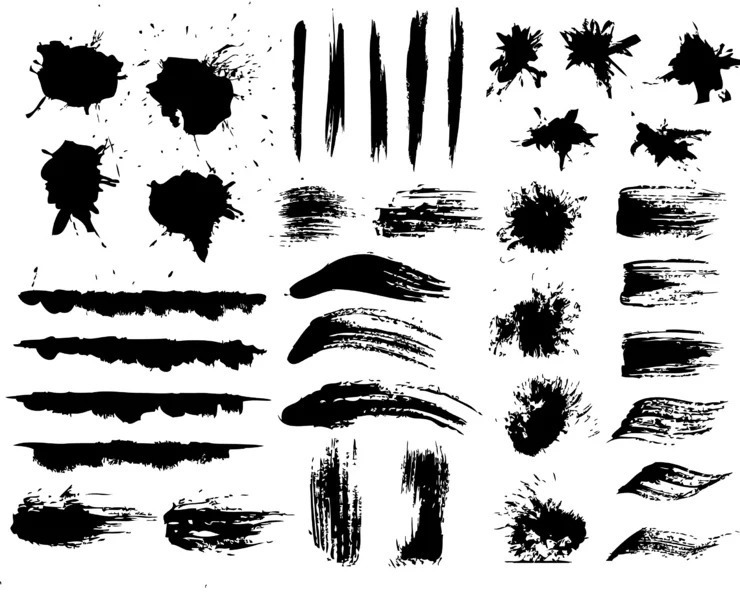
Custom brushes are specialized tools in digital art that allow artists to create unique textures, patterns, and effects within their artwork. These brushes are designed to replicate traditional artistic techniques while offering the flexibility and innovation that digital platforms provide. The significance of custom brushes lies in their ability to enhance creativity, enabling artists to generate distinctive styles and personalize their projects.Custom brushes find applications across various creative fields, including illustration, graphic design, photography, and 3D modeling.
In illustration, artists use custom brushes to add depth and detail to their designs, while graphic designers may rely on them to create eye-catching visuals or branding elements. Photographers often utilize custom brushes for retouching images and applying artistic effects. 3D artists implement brushes to add intricacies to textures for environments and characters, demonstrating their versatility and importance in the creative process.
Tools and Software for Creating Custom Brushes
Several digital tools and software applications are commonly used to create custom brushes, each offering distinct features tailored to different art styles and requirements. The choice of software often depends on the artist’s preferred medium and desired outcome. Below are some of the most popular options:
- Adobe Photoshop: Known for its robust brush engine, Photoshop allows artists to create and customize brushes extensively. Its variety of settings enables the manipulation of size, shape, and dynamics, making it a favorite among digital illustrators and graphic designers.
- Procreate: This iPad app is favored for its intuitive interface and extensive brush library. Artists can create custom brushes directly on their devices, offering a seamless experience for sketching and painting on the go.
- Corel Painter: Renowned for simulating traditional painting techniques, Corel Painter offers advanced brush creation tools that mimic the behavior of real media, appealing particularly to fine artists.
- Affinity Designer: This vector graphic design software provides options for creating custom raster brushes, making it suitable for both illustrators and graphic designers seeking precise control over their work.
These tools enable artists to experiment with various textures and effects, providing a platform for endless creativity. By utilizing custom brushes, artists can efficiently develop their signature styles and enhance their artistic capabilities.
Creating Custom Brushes
Creating custom brushes can significantly enhance your digital artwork, allowing you to achieve unique textures and styles tailored to your projects. This process is essential for artists seeking to expand their creative toolkit beyond the default brush presets available in software applications. By understanding the steps involved in creating custom brushes, you can develop a signature style that reflects your artistic vision.When creating custom brushes in popular software like Adobe Photoshop and Procreate, the process involves several key steps.
Each application offers distinct tools and settings that facilitate the creation of brushes, allowing users to design brushes suited to their specific needs. The following Artikels the process for both Adobe Photoshop and Procreate.
Step-by-Step Process for Creating Custom Brushes
In Adobe Photoshop, the creation of custom brushes involves the following steps:
1. Select the Brush Tool
Begin by selecting the Brush Tool from the toolbar or press the shortcut key ‘B’.
2. Open the Brush Settings Panel
Access the Brush Settings panel by clicking on the “Window” menu and selecting “Brush Settings”.
3. Choose a Base Shape
Select a brush shape or create a new one using the “New Brush Preset” option. This can be a simple shape or a complex pattern.
4. Customize Brush Dynamics
Adjust settings like Size Jitter, Angle Jitter, and Roundness Jitter in the “Shape Dynamics” section to create varied effects.
5. Modify Texture and Dual Brush Options
Introduce textures for additional depth and dimension by utilizing the “Texture” and “Dual Brush” settings.
6. Save the Brush
Once satisfied with the customization, click on “New Brush” in the Brush Settings to save your custom brush.In Procreate, the process is quite similar with a few variations:
1. Access the Brush Library
Tap on the brush icon to open the Brush Library.
2. Create a New Brush
Tap on the “+” icon to create a new brush.
3. Select Brush Properties
Customize properties such as Stroke Path, Taper, and Shape in the respective sections.
4. Experiment with Grain
Use the Grain section to apply custom textures, enhancing the brush’s appearance.
5. Adjust Settings
Modify settings like Size, Opacity, and Flow to achieve the desired effect.
6. Save Your Brush
Once complete, tap on “Done” to save your new brush into the library.
Tips for Selecting Materials and Textures
Choosing the right materials and textures is crucial in creating unique brushes. The quality and characteristics of the materials used directly influence the brush’s output. Here are some tips for selecting materials:
Natural Elements
Consider using textures from natural elements like leaves, stones, or wood. Scanning these materials can help create brushes that capture their unique surface qualities.
Fabric and Paper
Textures from fabric or handmade paper can add softness and depth to brush strokes, making them ideal for artistic effects.
Digital Sources
High-resolution images or scanned patterns can be converted into brush textures, allowing for infinite customization possibilities.
Customizing Brush Settings
After creating your custom brush, fine-tuning its settings is vital for achieving the desired performance. Customizing parameters such as size, opacity, and flow can greatly influence the final output. Here are key settings to consider:
Size
Adjusting the brush size is essential for varying line thickness and coverage. A larger size can create bold strokes while a smaller size is suitable for fine details.
Opacity
This setting controls the transparency of the brush strokes. Lowering the opacity can produce softer, more blended effects, while higher values yield solid, vibrant marks.
Flow
The flow setting determines the rate at which paint is applied. A higher flow results in more paint being laid down quickly, while a lower flow allows for more control and layering techniques.
Custom brushes provide artists with a powerful means of expression, allowing for greater creativity and individuality in their work.
Using Custom Brushes Effectively
Incorporating custom brushes into your artwork can significantly enhance your creative process and results. These brushes are not just tools but extensions of your artistic expression, allowing you to achieve unique textures, details, and styles. Understanding how to use them effectively is crucial for elevating your artwork to new heights.One of the primary advantages of custom brushes is the flexibility they offer, enabling artists to create diverse effects and styles.
This section will delve into techniques for utilizing custom brushes, emphasizing the importance of layering, blending, and matching brush types to various art styles.
Techniques for Incorporating Custom Brushes
To harness the full potential of custom brushes, it is essential to incorporate them through various techniques. The following methods can enhance your artwork significantly:
- Experimentation: Testing brushes on different canvases and in varying sizes can yield unexpected and exciting results. Artists should take time to explore how each brush behaves under different pressure levels and strokes.
- Combining Brushes: Layering different custom brushes can create complex textures and effects. For instance, using a textured brush over a smooth one can add depth and visual interest.
- Opacity Adjustment: Modifying the opacity of your brush strokes allows for seamless blending and helps in achieving a more nuanced look, especially in areas requiring subtle transitions.
- Masking Techniques: Utilizing masking layers when applying custom brushes can help in maintaining control over the artwork, allowing for corrections without damaging the underlying layers.
Importance of Layering and Blending
Layering and blending are crucial to achieving professional-quality artwork with custom brushes. Properly managing these elements can drastically improve the depth and realism of your pieces.
“Layering is not just about stacking; it’s about creating a harmonious composition.”
When using custom brushes, consider the following layering strategies:
- Base Layer: Start with a solid base layer using broad strokes to establish your primary colors and shapes.
- Subsequent Layers: Build additional layers gradually, introducing different brushes for highlights, textures, and details. This technique contributes to a dynamic visual experience.
- Blending Modes: Employ different blending modes available in your art software to create unique interactions between layers. This can help you achieve a more unified look and enhance the overall impact of your work.
Art Styles Benefiting from Specific Brushes
Different art styles can benefit greatly from the use of specialized custom brushes, enhancing the overall aesthetic and technique. Here are some notable examples:
- Digital Painting: Brushes that mimic traditional media, such as oil or watercolor, can create a rich, realistic texture that is essential for digital landscapes or portraits.
- Illustration: Custom brushes designed for line work can produce clean and crisp Artikels, perfect for illustrations needing precision and clarity.
- Textured Effects: Brushes that simulate textures, such as fabric or natural elements, are invaluable in creating backgrounds or adding depth to character designs, making them more engaging.
- Abstract Art: Utilizing a variety of unique, custom brushes can lead to spontaneous and imaginative compositions, essential for artists focusing on abstract styles.
By understanding and implementing these techniques, artists can effectively use custom brushes to enrich their work, resulting in captivating and dynamic art pieces.
Organizing and Managing Custom Brushes
Managing custom brushes effectively is crucial for artists and designers who rely on these tools for their creative processes. A well-organized brush library not only enhances workflow efficiency but also fosters inspiration and creativity. Understanding how to categorize and store brushes can simplify access and improve overall productivity.To begin organizing custom brushes, artists can employ various methods to categorize and store their brushes for quick and easy retrieval.
A systematic approach to classifying brushes based on styles, uses, or themes can significantly ease the search process.
Categorization Methods
The categorization of brushes can be approached in several ways, tailored to individual needs and preferences. Consider the following methods:
- Thematic Grouping: Arrange brushes according to specific themes such as landscapes, portraits, textures, or abstract designs. This allows for focused work within a particular genre.
- Functional Classification: Divide brushes into categories based on their intended use, such as detail brushes, blending brushes, or texture brushes, ensuring that artists can quickly locate the tool they need.
- Style-Based Organization: Organize brushes by artistic styles, such as realism, impressionism, or digital painting techniques, facilitating easier access based on the artist’s current project.
Creating a personalized brush library is essential for maintaining an organized workspace. The following strategies can enhance the effectiveness of a brush library:
Personalized Brush Library Strategies
Establishing a personalized brush library involves not only the organization of brushes but also a strategic approach to their maintenance and accessibility. Here are some effective strategies:
- Renaming Brushes: Rename brushes with descriptive titles that reflect their characteristics or intended applications, making them easier to find during creative sessions.
- Color Coding: Use color-coding systems to visually distinguish categories, which can speed up the selection process and enhance aesthetic appeal.
- Regular Maintenance: Periodically review and revise the brush library by removing unused brushes and adding new ones, ensuring that the library remains relevant and functional.
Backing up custom brushes and ensuring their transfer between devices is another critical aspect of brush management. The benefits of this practice extend beyond mere organization.
Backing Up and Transferring Brushes
Backing up custom brushes is an essential preventative measure that safeguards creative assets. The following points Artikel the significance of this practice:
- Data Security: Regular backups protect against data loss due to hardware failures or software issues, ensuring that valuable custom brushes are not permanently lost.
- Seamless Device Transition: Transferring brushes between devices allows artists to maintain a consistent workflow across multiple platforms, whether working on a desktop, tablet, or mobile device.
- Collaboration Opportunities: Backing up and sharing brushes with other artists can foster collaboration and inspire new techniques, broadening creative horizons.
“A well-organized brush library not only enhances workflow efficiency but also fosters inspiration and creativity.”
Troubleshooting Common Issues
Creating and utilizing custom brushes can enhance your artistic workflow significantly; however, users may encounter certain challenges along the way. Identifying and resolving these issues is crucial to maintaining an effective and efficient creative process. In this section, common problems associated with custom brushes will be addressed, alongside practical solutions to enhance performance and restore functionality.
Common Problems with Custom Brushes
Several issues may arise while using or creating custom brushes, impacting their effectiveness. Understanding these problems helps streamline the troubleshooting process. Here are several common issues:
- Brush Lagging: Users may experience delays in brush response, which can disrupt the flow of creativity.
- Brush Not Appearing: Sometimes, custom brushes do not show up in the brush panel, leading to confusion and frustration.
- Inconsistent Output: Variability in brush strokes may occur, where the expected effect is not achieved consistently.
- Brush Malfunction: Custom brushes may behave unexpectedly, such as producing unintended results or failing to work entirely.
Fixing Brush Performance Issues
Addressing performance issues is essential for optimizing the use of custom brushes. Below are some strategies to enhance brush functionality:
- Adjust Brush Settings: Begin by reviewing the settings of the custom brush. Parameters such as size, spacing, and dynamics can be tweaked to improve responsiveness.
- Check System Performance: Ensure that your device meets the software requirements for running design programs efficiently. Close unnecessary applications that may consume system resources.
- Update Software: Keeping your design software up-to-date can resolve bugs that may affect brush performance, incorporating the latest fixes and enhancements.
- Reset Preferences: If certain brushes are malfunctioning, resetting tool or application preferences may restore functionality.
Restoring Default Brushes
In situations where custom brushes cause issues, users may need to revert to default brushes to continue their work. Restoring default brushes is a straightforward process that can alleviate many problems. Here’s how to do it:
- Access Brush Settings: Navigate to the brush panel within your design software and locate the option to manage or restore brushes.
- Choose Restore Default: Most software has a specific option to restore the original brushes that come with the program. This usually resolves any conflicts caused by custom brushes.
- Backup Custom Brushes: Before restoring, consider backing up your custom brushes to avoid losing them permanently.
- Reload Custom Brushes: After restoring defaults, you can re-import your custom brushes and test their functionality to ensure they operate smoothly.
Restoring default brushes can be an effective way to troubleshoot issues without losing valuable time and creativity.
Advanced Techniques with Custom Brushes
Exploring advanced techniques with custom brushes can significantly enhance your artwork, enabling you to create unique textures and effects that mimic traditional media. By leveraging the capabilities of digital tools, artists can achieve results that rival traditional painting methods while enjoying the benefits of flexibility and efficiency.
Designing Brushes that Mimic Traditional Media
Creating custom brushes that replicate the essence of traditional media, such as watercolor or ink, requires an understanding of the characteristics that define these art forms. The right settings and techniques can bring the fluidity of watercolor or the sharpness of ink to your digital canvas. To develop brushes that mimic traditional media, consider the following elements:
- Texture and Grain: Incorporating textures that resemble the surface of watercolor paper or canvas can enhance the authenticity of your brushes. Use high-resolution images of these surfaces as a basis for your brush settings.
- Opacity Dynamics: Traditional watercolor relies on layering and transparency. Adjust your brush settings to allow for varying opacity, enabling colors to blend seamlessly.
- Flow Settings: Mimicking the fluidity of ink or paint involves fine-tuning the flow settings. Use a pressure-sensitive tablet to adjust the flow based on the pressure applied, allowing for more expressive strokes.
- Shape and Size Variability: Create brushes that change size or shape based on the speed or pressure of your strokes, mimicking the way natural brushes behave.
“The key to emulating traditional mediums is to understand their physical properties and replicate them digitally.”
Advanced Settings and Techniques for Refining Brush Dynamics
Refining brush dynamics involves experimenting with advanced settings to achieve the desired effects in your artwork. The following techniques can enhance your brush’s performance and versatility:
- Jitter Settings: Utilize jitter settings to introduce randomness in size, angle, or opacity, which can create a more organic appearance in your strokes.
- Dual Brush Techniques: Combine two brushes to create unique effects. This allows artists to layer textures and styles, providing a richer visual experience.
- Texture Overlays: Incorporating texture overlays can add depth and complexity to your brush strokes. Experiment with different textures to see how they interact with your brush dynamics.
- Brush Stabilization: Enabling brush stabilization can help create smoother lines, particularly useful for ink-like brushes where precision is key.
“Mastering brush dynamics can elevate your custom brushes from simple tools to powerful creative instruments.”
Exporting and Sharing Custom Brushes with the Artist Community
Once you have created a selection of custom brushes, sharing them with the artist community can foster collaboration and inspiration. Exporting and sharing your brushes involves a few straightforward steps:
- Exporting Brushes: Most digital art programs allow you to export your custom brushes as files. Save them in commonly used formats to ensure compatibility with different software.
- Create Installation Instructions: When sharing your brushes, include clear installation instructions to help others add them to their own software smoothly.
- Online Platforms: Utilize platforms like social media, art forums, or dedicated sites (such as Gumroad or DeviantArt) to share your brushes. Make sure to engage with users to gather feedback and ideas.
- License Your Brushes: Consider providing a license or usage guidelines to ensure that your brushes are used in a manner that aligns with your intentions as an artist.
“Sharing your custom brushes can not only enhance your personal brand but also enrich the artistic community by sparking creativity and collaboration.”
Inspirational Examples of Custom Brush Usage
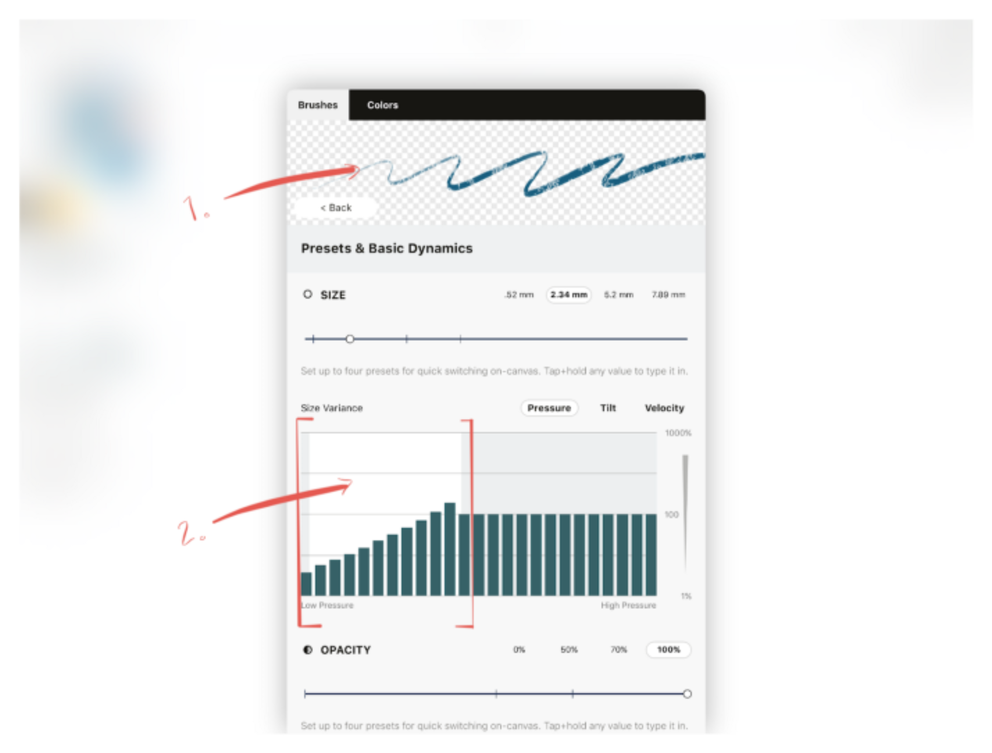
The realm of digital art has been dramatically transformed by the implementation of custom brushes, allowing artists to explore new dimensions of creativity. Custom brushes serve not just as tools, but as a means of self-expression that can define an artist’s unique style. This segment examines notable artists who have effectively utilized custom brushes, showcasing their diverse applications in various art styles.
Artists Utilizing Custom Brushes
Numerous contemporary artists have harnessed the power of custom brushes to enhance their artwork, each bringing their distinctive touch to the digital canvas. Below are examples of artists who have set themselves apart through innovative brush usage:
- Artgerm (Stanley Lau): Renowned for his stunning illustrations, Artgerm employs custom brushes to create detailed textures in his character designs. His work often features vibrant colors and intricate details that captivate audiences.
- Loish (Lois van Baarle): Celebrated for her whimsical style, Loish effectively uses custom brushes to create soft, painterly effects in her character art. Her unique brush strokes contribute to the flowing movement and emotional depth of her illustrations.
- Feng Zhu: As a concept artist, Feng Zhu demonstrates the versatility of custom brushes in his environment designs, utilizing them to depict landscapes and futuristic concepts with striking realism and depth.
- James Gurney: The artist behind the “Dinotopia” series, Gurney showcases custom brushes in his digital paintings to replicate traditional painting techniques, thereby enriching the overall texture and atmosphere of his work.
Diverse Art Styles Showcasing Custom Brushes
The application of custom brushes spans a variety of art styles, each benefiting uniquely from their capabilities. Below are some notable art styles that effectively incorporate custom brushes:
- Digital Painting: Artists often create lifelike portraits or imaginative landscapes using brushes that simulate traditional media, allowing for rich textures and layered depth.
- Vector Art: Custom brushes can produce unique vector shapes and line work, facilitating an innovative approach to creating illustrations that maintain clarity and precision.
- Fantasy Illustration: In this genre, custom brushes are integral for designing fantastical elements, such as magical effects or intricate patterns, which enhance the imaginative quality of the artwork.
- Textured Typography: Graphic designers utilize custom brushes to create textured letters and words that capture attention, adding a dimensional quality to typographic compositions.
Impact of Custom Brushes on Creativity
Custom brushes significantly influence creativity and artistic expression by enabling artists to explore new techniques and styles. By providing specific textures and effects, these brushes allow for greater experimentation and innovation within their work.
“Custom brushes unlock new possibilities for artistic exploration, empowering creators to push the boundaries of their imagination.”
The introduction of custom brushes has not only expanded the toolkit available to artists but has also fostered a community where collaboration, sharing, and learning thrive. Artists can now communicate their visions more effectively, bridging the gap between traditional and digital mediums.
Last Recap
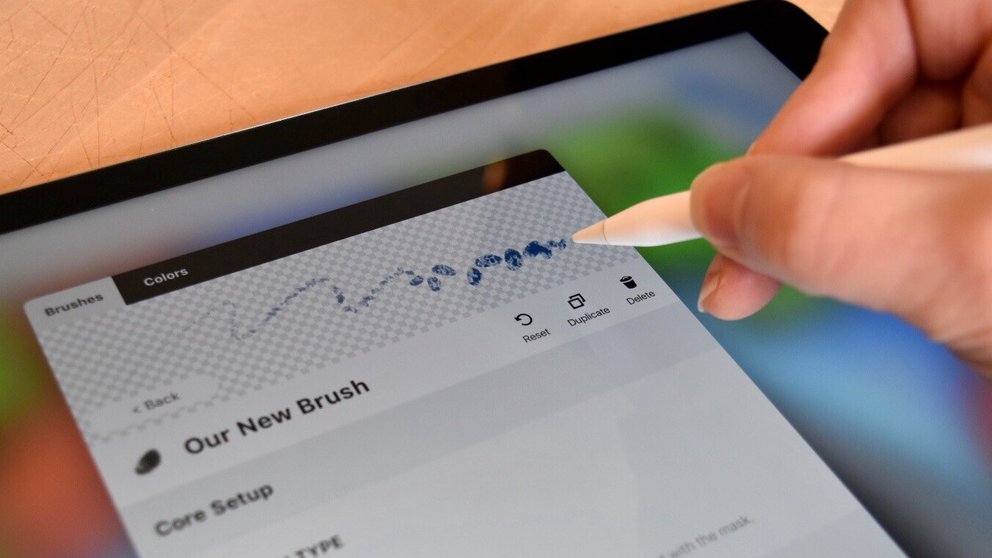
In summary, mastering the art of creating and using custom brushes is an invaluable skill for any digital artist. This guide has provided a comprehensive overview of techniques, organization methods, and troubleshooting tips that ensure a seamless artistic journey. With the inspiration drawn from fellow artists and the knowledge gained, readers are encouraged to experiment and innovate, allowing custom brushes to further enrich their artistic expression and creativity.